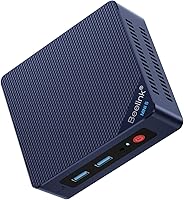
Beelink EQi12 Mini PC Review: Worth It? (November 2026)
The Beelink EQI12 is the mini PC to buy for a fast, tidy home or office desk. Its Core i3-1220P, 16GB DDR4 and 500GB PCIe 4.0 SSD cover browsing, documents and light creative work, and the built-in 85W supply means one cable for power.
On this page (8 sections)
The Beelink EQI12 is the mini PC to buy for a fast, tidy home or office desk. Its Core i3-1220P, 16GB DDR4 and 500GB PCIe 4.0 SSD cover browsing, documents and light creative work, and the built-in 85W supply means one cable for power.
This Beelink EQi12 mini PC review looks at what the hardware does for real desk tasks, where the ports go and what you give up. The short answer: it fits most desks well, as long as you don't expect it to play demanding games.
The Beelink EQI12 at a glance
The EQI12 packs a 10-core Intel Core i3-1220P and 16GB of dual-channel DDR4 into a case under 5 inches square. It's a small desktop that aims at the everyday jobs most people actually do, not at gaming or heavy video work.
Beelink EQI12 Mini PC: Best for a fast, tidy home office desk

- Intel Core i3-1220P, 10 cores and 12 threads
- 16GB DDR4 RAM (2x8GB)
- 500GB M.2 PCIe 4.0 SSD
- Dual HDMI at 4K 60Hz
- Built-in 85W power supply
A compact desktop with a 10-core Intel chip and plenty of memory for everyday multitasking. The built-in power supply keeps the desk clean.
Pros
- 10 cores and 12 threads for everyday multitasking
- 16GB of RAM in two slots, expandable to 64GB
- PCIe 4.0 SSD leaves room for a second drive
- Dual HDMI and dual Gigabit LAN
- Built-in power supply means no external brick
- Quiet running at about 32dB
Cons
- Intel UHD graphics are not for serious gaming
- MSC2.0 cooling needs a little clearance around the case
The built-in power supply is the detail that stands out on a desk. Many mini PCs need a separate adapter the size of a small brick, and this one doesn't, so the setup stays close to a single cable plus your monitor leads.
The 85W supply sits inside the case and feeds from one AC cable. That means the only thing behind your desk is the machine itself and the leads to your screens.
Look at the port list and the same tidiness shows up there. Two HDMI outputs sit on the back, each rated to 4K at 60Hz, next to three USB 3.0 ports and one USB 2.0 port.
There is a single USB-C port for data transfer and a 3.5mm audio jack for a headset or speakers. Two Gigabit LAN ports round it out.
The case is 4.96 x 4.96 x 1.74 inches and comes in black.
Beelink fits MSC2.0 vapor chamber cooling, a silent fan and an SSD heat sink, and rates daily noise as low as 32dB. The machine also supports Wake On LAN, PXE Boot, RTC Wake and Auto Power On, which matters if you plan to use it as a small server rather than a desk PC.
Beelink says the EQI12 carries FCC, CE and RoHS certification.
Who the Beelink EQI12 suits
Buy it if your day is browsing, Office files, video calls and streaming, with the odd photo edit or light design task. The i3-1220P's 10 cores and 12 threads keep those jobs moving without the fan making a fuss.
Beelink lists PS, Office, PR, CAD and AI tools among the software the machine is meant to handle, so light creative work sits within its reach.
It's also a good fit for a two-monitor desk. Dual HDMI at 4K 60Hz means you can run two screens without adapters or dongles, which is handy for spreadsheets beside a browser or a document beside a call.
The two Gigabit LAN ports suit anyone who wants one network for the internet and another kept separate, and the built-in supply keeps the cable count down.
Skip it if you want a gaming machine or a video-editing workstation. The Intel UHD graphics handle 4K playback and casual titles like League of Legends or Fall Guys, but not modern games at high settings.
If you're still deciding between form factors, our guide to what is a mini PC explains what these small machines can and cannot do.
The server-style features are worth weighing too. Wake On LAN, PXE Boot, RTC Wake and Auto Power On make it a plausible fit for a small home server or a machine you want to switch on at a set time.
For Auto Power On, Beelink asks you to send the barcode on the bottom of the case and it sends the tutorial file.
The specs that matter in daily use
The i3-1220P and 16GB of RAM are the parts you'll feel every day. Ten cores and twelve threads keep a busy browser, a document and a video call from fighting each other, and 16GB of DDR4 3200MHz gives them room to work.
The chip's turbo reaches 4.4GHz and it carries 12MB of L3 cache.
The 500GB M.2 PCIe 4.0 SSD covers the system, apps and a healthy pile of files. A second M.2 slot takes total storage to 4TB, so you can add a drive later without replacing the first one.
Beelink lists the dual-channel M.2 support as reaching 2TB per slot. Two memory slots mean RAM can grow to 64GB as well.
Graphics come from Intel UHD at 1.10GHz. That's fine for 4K video playback and two screens, and it's the part that limits gaming.
The case measures 4.96 x 4.96 x 1.74 inches, small enough to sit behind a monitor or under a shelf.
WiFi 6 and Bluetooth 5.4 handle wireless, and dual Gigabit LAN gives you two wired ports. The WiFi 6 radio brings faster transfer speeds and steadier connections than older wireless standards, which helps on a busy home network.
Beelink says the MSC2.0 vapor chamber, silent fan and SSD heat sink keep the CPU, SSD and memory cool, with noise as low as 32dB in daily use. That's about the level of a quiet room, so it won't intrude on calls.
Setting up the Beelink EQI12 on your desk
Setting up is quick: connect the power cable and your monitor, then finish the Windows setup. With the supply built in, there's no brick to find space for, just the AC cable that comes in the box.
The box also holds an HDMI cable and a user manual.
Plug one or both HDMI leads into your monitors and the keyboard and mouse into the USB ports. The USB-C port handles data transfer, and the 3.5mm jack takes headphones or a headset.
The two Gigabit LAN ports are useful if you want one for the internet and one for a separate network or a NAS. The machine lists support for external storage drives, headphones, keyboards, monitors, mice, projectors and speakers, so most desk peripherals connect without an adapter.
Beelink says the EQI12 supports Wake On LAN, PXE Boot, RTC Wake and Auto Power On. Those settings suit a machine used as a small server.
For Auto Power On, Beelink asks you to send the barcode on the bottom of the case, and it sends the tutorial file.
Leave a little room around the case so the fan can pull air through. A tight shelf or a spot against a wall warms the machine for no good reason.
If you later add a second SSD, the second M.2 slot is ready for it.
Keeping it cool and running well
Keep the vents clear and give the fan room to breathe. The MSC2.0 cooling design moves heat away from the CPU, SSD and memory, and it works best when air can flow around the case.
Dust is the main thing that builds up over time. Wipe the outside with a soft dry cloth and blow dust out of the vents every few months if the desk is in a busy room.
A can of compressed air aimed at the intake and exhaust slots does most of the job. The dustproof design Beelink built in slows the build-up, but it does not remove the need for the occasional clean.
Check the storage from time to time as well. Windows shows how full the 500GB drive is, and leaving a chunk free keeps updates and file writes running smoothly.
If the drive fills up with media, the second M.2 slot is the cheap upgrade. An SSD heat sink is part of the cooling design, so a second drive benefits from the same airflow.
Keep the machine on a hard, flat surface rather than a soft mat or carpet. That helps airflow and stops the case from sinking into fabric, and it keeps the bottom panel clear where the cooling air enters.
For more general tips on these small machines, our look at the Beelink SER5 covers a Ryzen desk setup and how it compares in daily use.
Where the Beelink EQI12 falls short
The Intel UHD graphics are the clear limit. They handle 4K video and light games, but they aren't built for demanding titles or heavy 3D work.
If gaming matters more than desk work, this isn't the right machine. The 1.10GHz graphics clock is the figure to keep in mind when you read game requirements.
The dual HDMI design means no DisplayPort, so check what your monitors take before you buy. The single USB-C port is for data only, so it won't drive a display either.
Cooling is a consideration rather than a flaw. The fan runs quietly, but a closed cabinet or a stack of books on top would trap heat, and the MSC2.0 system needs airflow to work as designed.
And while 16GB of RAM is plenty for everyday tasks, someone running large datasets or many virtual machines will want the 64GB upgrade sooner. That's an easy change thanks to the two slots, but budget for it if that's your workload.
The 32dB noise figure also assumes normal desk use; a long, heavy load will make the fan work harder and sound louder.
Alternatives worth comparing
Two other Beelink models cover different needs, and each one is a better fit than the EQI12 in a specific case. Both are worth a closer look before you settle on the EQI12.
For the lowest-power desk, the Beelink MINI S12 Pro
The MINI S12 Pro runs an Intel N100 and draws less power for light everyday work. It's the pick when the machine mostly handles browsing and documents and you want the simplest, most efficient setup.
Its 2.5G LAN port is faster than the EQI12's Gigabit ports, which helps if you move big files over a wired network. The 4-core N100 does less heavy lifting than the i3-1220P, so choose it for light use rather than for multitasking.
Its 16GB of DDR4 and 500GB SSD match the EQI12's capacity, and it also runs two HDMI screens at 4K 60Hz. The difference is the chip: 4 cores and 4 threads against the EQI12's 10 and 12.
For AMD fans, the Beelink EQR5
The EQR5 uses an AMD Ryzen 3 7330U with 4 cores and 8 threads. It's a reasonable alternative if you prefer AMD hardware or already run an AMD setup.
It carries 16GB of DDR4 in two 8GB modules and a 500GB M.2 2280 NVMe SSD, with the same 64GB RAM ceiling and 4TB storage ceiling as the EQI12.
Its Radeon graphics at 1800MHz are a step up from Intel UHD for casual games. The EQI12 still wins on core count and on the tidy built-in power supply.
The EQR5 also lists dual Gigabit LAN, WiFi 6 and Bluetooth 5.2, so the wireless story is close. If you want a closer brand comparison, our GMKtec vs Beelink piece weighs the two makers side by side.
Verdict: buy the Beelink EQI12 for desk work
Buy the Beelink EQI12 if you want a fast, compact desktop for a home or office desk. The 10-core i3-1220P, 16GB of DDR4 and the PCIe 4.0 SSD handle everyday work with room to grow, and the dual HDMI ports and built-in power supply keep the setup simple.
Skip it if gaming or heavy creative work is the main job, because the Intel UHD graphics won't carry those tasks. For light everyday use, the MINI S12 Pro is the more efficient choice; for casual gaming on AMD hardware, the EQR5 is the alternative to weigh.
For most desk setups, the EQI12 is the one we'd choose. It's the best all-round pick of the three, and its expandable RAM and storage mean it stays useful as your needs grow.
The two memory slots and two M.2 slots are what give it that longer life, and the built-in supply keeps the desk as clean as the day you set it up.
Frequently asked questions
Is the Beelink EQI12 good for everyday office work?
Yes. The Core i3-1220P has 10 cores and 12 threads, and 16GB of DDR4 RAM handles a browser with many tabs plus documents and video calls.
The 500GB PCIe 4.0 SSD keeps app launches and file saves quick.
Can the Beelink EQI12 run two 4K monitors?
Yes. It has two HDMI ports, each rated to 4K at 60Hz, so you can run dual 4K screens without an adapter.
Windows handles the arrangement, and both ports output at the same time.
How much RAM and storage can the Beelink EQI12 take?
It ships with 16GB of DDR4 in two 8GB modules and supports up to 64GB across its two slots. Storage starts at a 500GB M.2 2280 PCIe 4.0 SSD, and a second M.2 slot takes the total to 4TB.
Does the Beelink EQI12 have a power adapter?
No external brick is needed. The 85W power supply is built into the case, so a single AC cable is all you connect.
That keeps the desk tidier than mini PCs that carry a separate adapter.
Is the Beelink EQI12 quiet enough for a shared room?
Beelink rates daily running noise at about 32dB, close to a soft whisper. The MSC2.0 vapor chamber and silent fan spread heat from the CPU, SSD and memory, so the fan rarely needs to spin up under normal desk work.