6 Best Mini PCs Under $300 (November 2026)
The best mini PCs under 300 dollars include the Bosgame E5 Plus mini PC for growing home offices, the Acemagic Ryzen 3 PRO mini PC for multi-screen office work, and the GMKtec G3S mini PC for everyday desk tasks.
On this page (10 sections)
- How we chose mini PCs under 300 dollars
- Compare the best mini PCs under 300 dollars
- The best mini PCs under 300 dollars in detail
- How to match a budget mini PC to your daily work
- Check monitors, Windows and the full setup before buying
- How to set up and care for a budget mini PC
- Common mistakes when buying a mini PC under 300 dollars
- Which mini PC under 300 dollars fits your setup?
- FAQ about mini PCs under 300 dollars
- Make the final choice around your daily workload
The Bosgame E5 Plus mini PC is our pick for the best mini PC under 300 dollars because it combines a Ryzen processor, useful upgrade options and connections for three monitors. It suits a home office that may need more memory, storage or screen space later.
Your best choice can change if you want to avoid upgrades. Some alternatives include more memory or a larger drive, which can matter more than unused ports.
For a simpler shortlist, see our guide to budget mini PCs worth buying. If you want to compare more models by daily use, read our mini PC buyer's guide.
Our picks at a glance
-
1

-
2

-
3

How we chose mini PCs under 300 dollars
We favored everyday usefulness and room to grow: processors suited to office tasks, enough memory for common apps, practical storage and monitor connections. These scores reflect that balance, so the highest-ranked model won't suit every desk.
A small desktop used for email needs less headroom than one running a video call, a spreadsheet and several browser windows together. We gave upgrade options weight because replacing memory or adding storage can extend a useful setup.
We also separated display support from computing power. Sending a picture to a high-resolution screen does not mean a PC can run demanding games or edit complex video projects comfortably.
Compare the best mini PCs under 300 dollars
Start with your workload and existing monitors, then compare included memory and storage. The first two picks favor office expansion, while the lower picks offer different balances of ready-to-use capacity and basic computing.
Use the table to spot the tradeoff you would notice daily. Extra drive space helps a local file library, while extra memory helps keep more work open at once.
| Product | Best for | Processor | Memory and storage | Display outputs | Our score |
|---|---|---|---|---|---|
| Bosgame E5 Plus mini PC | growing home offices | AMD Ryzen 3 5400U | 8GB DDR4, 256GB SATA SSD | HDMI, DisplayPort and USB-C | 8.9 |
| Acemagic Ryzen 3 PRO mini PC | multi-screen office work | AMD Ryzen 3 PRO 7330U | 8GB RAM, 256GB SSD | HDMI, DisplayPort and USB-C | 8.7 |
| GMKtec G3S mini PC | everyday desk tasks | Intel N95 | 8GB DDR4, 256GB SSD | 2 x HDMI 2.0 | 8.5 |
| Kamrui AK1PLUS mini PC | busy browser users | Intel Celeron N5095 | 16GB LPDDR4X, 256GB SSD | 2 x HDMI 2.0 | 8.2 |
| Beelink Mini S12 mini PC | document-heavy home desks | Intel N95 | 8GB DDR4, 480GB SSD | 2 x HDMI | 8.0 |
| Beelink SER3 16GB mini PC | upgrade-averse office users | AMD Ryzen 3 3200U | 16GB DDR4, 500GB NVMe SSD | 2 x HDMI | 7.9 |
The best mini PCs under 300 dollars in detail
The Bosgame E5 Plus leads for a growing desk setup, but each alternative solves a different buying problem. Read the fit and skip advice before choosing by rank alone.
Bosgame E5 Plus mini PC: Best for growing home offices
- Ryzen 3 5400U, 4 cores and 8 threads
- 8GB DDR4 RAM, expandable to 64GB
- 256GB SATA SSD plus an NVMe slot
- HDMI, DisplayPort and USB-C video outputs
Room for a growing workspace comes from two memory slots, a spare storage slot and connections for three monitors.
Pros
- Memory can be expanded to 64GB
- Separate NVMe slot for added storage
- Three display outputs and dual 2.5GbE networking
Cons
- Memory upgrade may help busy office use
- Included SSD leaves limited room for large media collections
Choose the Bosgame E5 Plus for an office that may grow beyond one monitor and a few everyday apps. Its Ryzen 3 5400U has 4 cores and 8 threads, making it a sensible starting point for mixed office work.
It starts with 8GB DDR4 memory and a 256GB SATA SSD. Two SODIMM slots support up to 64GB, and a separate M.2 NVMe slot lets you add storage without replacing the included drive.
HDMI, DisplayPort and USB-C video outputs each support up to 4K at 60Hz. That gives you room to keep a main document, reference material and a communication window on separate screens.
Dual 2.5GbE ports are useful for a planned wired-network setup, though most home desks need only one network connection. Windows 11 Pro is included.
Skip it if you want more memory immediately and won't fit upgrades. For help choosing compatible capacities and connections, read our guide on how to choose a mini PC.
Acemagic Ryzen 3 PRO mini PC: Best for multi-screen office work
- AMD Ryzen 3 PRO 7330U, 4 cores and 8 threads
- 8GB RAM and 256GB SSD
- HDMI, DisplayPort and USB-C video
- Pre-installed Windows 11 Pro
A fit for a multi-screen office where Windows 11 Pro and room for later memory and storage upgrades matter.
Pros
- Ryzen processor with 4 cores and 8 threads
- Windows 11 Pro included
- Dual memory slots and two storage slots
Cons
- Starts with 8GB RAM
- Bluetooth 4.2
Choose the Acemagic Ryzen 3 PRO mini PC for office work spread across several screens. Its Ryzen 3 PRO 7330U has 4 cores and 8 threads, and Windows 11 Pro comes installed.
HDMI, DisplayPort and USB-C video connections support a three-screen workspace. This layout suits a desk where you keep a spreadsheet open beside email and a browser-based work app.
The included 8GB memory and 256GB SSD cover a modest starting setup. Dual memory slots and M.2 SATA and NVMe storage slots provide room for expansion, with storage support up to 4TB total.
Its cooling system uses an aluminum chassis, an 80mm fan and dual exhausts. Leave those airflow paths clear rather than pushing the case against a wall or stacking equipment around it.
Skip it if your priority is more memory without opening the case. It also makes little sense to choose it just for three outputs when your desk will use one screen.
GMKtec G3S mini PC: Best for everyday desk tasks
- Intel N95, 4 cores and 4 threads
- 8GB DDR4 RAM and 256GB SSD
- Two HDMI 2.0 outputs
- Wake-on-LAN, PXE boot and RTC wake
A straightforward everyday desktop for email, documents and browsing, with two HDMI outputs for a second screen.
Pros
- Dual 4K at 60Hz HDMI outputs
- Wired and wireless networking
- Remote and scheduled startup options
Cons
- Less memory for heavy multitasking
- Small SSD for a large local file library
Choose the GMKtec G3S for a straightforward email, document and browsing computer. Its Intel N95 has 4 cores and 4 threads, paired with 8GB DDR4 memory and a 256GB SSD.
Two HDMI outputs support dual 4K displays at 60Hz. That makes it easy to reuse two HDMI monitors without planning a mixed set of video cables.
Wake-on-LAN, PXE boot, RTC wake and automatic power-on provide options for remote or scheduled startup. These features help with a planned display or small server role, but the software and network still need proper setup.
GMKtec backs purchases from October 2026 with a three-year warranty: whole-unit returns and replacements in year 1, then major-component replacement in years 2 and 3.
Skip it for a crowded daily workload or a large local media collection without a storage plan. Our GMKtec G3S mini PC review explains its fit for everyday tasks in more detail.
Kamrui AK1PLUS mini PC: Best for busy browser users

- Intel Celeron N5095, 4 cores and 4 threads
- 16GB LPDDR4X RAM and 256GB SSD
- Two HDMI outputs
- Supports M.2 and 2.5-inch storage expansion
More memory without an immediate upgrade suits browser-heavy desk work, with space to expand local storage later.
Pros
- 16GB RAM included
- Dual HDMI monitor connections
- M.2 and 2.5-inch storage options
Cons
- Extra RAM does not increase processor capability
- Included storage may need expansion for media
Choose the Kamrui AK1PLUS when you want more memory from the start for browser windows, documents and communication apps. It includes 16GB LPDDR4X memory and a 256GB SSD, paired with an Intel Celeron N5095 processor.
That memory capacity gives open apps more room, but it doesn't make demanding calculations or video exports a good match. Choose it for keeping ordinary work open, rather than for heavy processing.
Two HDMI outputs support dual 4K screens at 60Hz. Four USB 3.2 ports provide connections for common desk accessories, such as a keyboard, mouse, printer and external drive.
Storage expansion supports an M.2 drive and an additional 2.5-inch SATA drive, with up to 2TB in each position. This is useful if your documents and media outgrow the starting drive.
Skip it if your main app needs stronger processor performance. Don't assume its included memory is replaceable just because storage expansion is supported.
Beelink Mini S12 mini PC: Best for document-heavy home desks

- Intel N95, 4 cores and up to 3.4GHz
- 8GB DDR4 RAM and 480GB SSD
- Two HDMI 4K at 60Hz outputs
- Four USB 3.2 Gen 2 ports
Extra included storage for local files makes this useful for a home desk with documents, photos and downloaded media.
Pros
- 480GB SSD included
- Four USB 3.2 Gen 2 ports
- VESA mounting bracket included
Cons
- 8GB RAM limits multitasking headroom
- Bluetooth 4.2
Choose the Beelink Mini S12 when local file space matters more than extra memory at setup. Its Intel N95 processor is paired with 8GB DDR4 memory and a 480GB SSD.
The larger starting drive gives documents, photos and downloads more room than the smaller-drive configurations here. It suits a home admin desk where you keep files locally but don't run many demanding apps together.
Two HDMI outputs support dual 4K displays at 60Hz, and four USB 3.2 Gen 2 ports offer connections for accessories and external storage. A fast USB connection is useful for file transfers when the attached drive supports it too.
Beelink includes a VESA bracket for a compatible monitor mount. Read our guide to mounting a mini PC behind a monitor before planning cable lengths and access to ports.
Skip it if memory is your main constraint. More SSD capacity won't prevent slowdowns caused by keeping too much active work open.
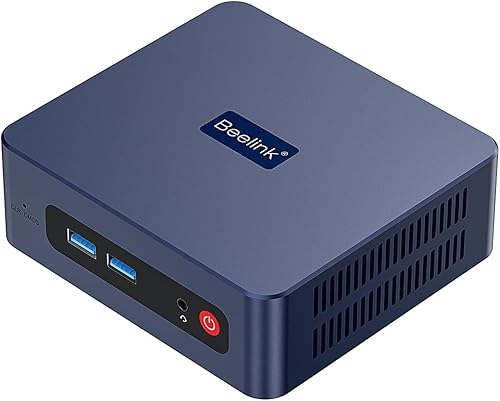
Beelink SER3 16GB mini PC: Best for upgrade-averse office users
- AMD Ryzen 3 3200U, 2 cores and 4 threads
- 16GB DDR4 RAM and 500GB NVMe SSD
- Two HDMI outputs
- Memory and storage can be expanded
More memory and storage at setup suits routine office users who want to postpone buying and fitting extra parts.
Pros
- 16GB RAM and 500GB NVMe SSD included
- Windows 11 Pro included
- Memory and storage expansion supported
Cons
- Dual-core processor is a compromise for demanding work
- No third display output
Choose the Beelink SER3 if you want useful memory and storage capacities without an immediate parts upgrade. It includes 16GB DDR4 memory, a 500GB NVMe SSD and Windows 11 Pro.
Its Ryzen 3 3200U has 2 cores and 4 threads. That makes this a capacity-first choice for routine office tasks, rather than the pick for demanding processor work.
Two HDMI outputs support dual 4K displays at 60Hz. Wi-Fi 5, Bluetooth 5.0, Gigabit Ethernet and four USB 3.2 ports cover common home-office connections.
Memory can expand to 32GB, the NVMe drive to 2TB, and an additional 2.5-inch SATA drive can add up to 2TB. You can leave those options unused until your actual storage or memory needs change.
Skip it for processor-heavy work or a three-screen desk. Its appeal is having more room for ordinary apps and files at setup, with fewer reasons to buy extra parts right away.
How to match a budget mini PC to your daily work
Choose the processor for the work you do, memory for the work you keep open, and storage for the files you keep locally. Treat these as separate decisions rather than assuming one large number makes the whole computer better.
Choosing the best mini PC under 300 for office tasks
Start with your busiest normal workday. A desk used for email and a few documents has different needs from one handling a video meeting, shared spreadsheet, browser app and background sync together.
For that mixed workload, favor the first two picks and plan memory around the apps you use. For lighter work, a simpler model can leave more of your overall budget for a comfortable screen and keyboard.
Check the requirements of any specialist software before choosing. Accounting tools, design apps and large spreadsheets can have needs that go beyond basic browsing and word processing.
When more memory matters
16GB is the more comfortable target for frequent multitasking, while 8GB can cover a simpler workload. Browser extensions, large web apps and video calls all add to memory use.
Extra memory helps prevent the computer from relying as heavily on its storage to hold active work. It won't shorten every task, especially when the processor or internet connection is the limiting factor.
If you plan to upgrade, check the memory type, slot arrangement and supported capacity first. Buying the wrong module can turn a simple improvement into a return and another order.
How much storage to choose
A smaller SSD can suit cloud documents, email and a modest app collection. Choose more starting space if you keep photos, downloaded videos, large presentations or offline copies of shared folders.
The usable space will be lower than the advertised drive capacity after formatting, Windows and apps. Leave room for updates and temporary files instead of planning to fill the drive completely.
A second internal drive adds capacity, but it isn't a complete backup. Keep another copy of important files on a separate device or backup service.
Why an SSD upgrade won't solve every slowdown
A faster drive can help file work and loading, but it won't replace processor power or memory. Don't choose an NVMe label over the capacity and workload fit you actually need.
If a computer slows down only during a demanding app, check that app's requirements. If it slows down as you open more ordinary apps, memory deserves a closer look.
Check monitors, Windows and the full setup before buying
Count everything needed to make the computer usable, including the display, input devices, cables and any planned upgrades. A compact desktop still needs a complete desk setup.
Match video outputs to monitor inputs
Check the sockets on your monitors before ordering cables. Two HDMI outputs suit two HDMI monitors, while a mixed HDMI, DisplayPort and USB-C setup may need different cable types.
Don't assume every USB-C socket carries video. The video-capable USB-C connections on the first two picks are useful, but that feature should never be assumed from the connector shape alone.
A screen's resolution and refresh rate also depend on the monitor and cable. For office use, readable text, comfortable scaling and enough physical desk space matter more than choosing the highest resolution available.
Check the Windows edition you need
Confirm the operating system for the exact configuration, especially if you need Windows ready for work. The included edition is clear for some picks here, but shouldn't be inferred for the others.
Windows Pro matters if you need a particular Pro feature or your workplace requires it. It doesn't make a processor faster or add memory.
Our guide to whether mini PCs come with Windows explains what to confirm before buying. Include any required operating-system license in your setup plan.
Count accessories and upgrades together
Check whether you need a webcam, speakers, headset, extra display cable or USB hub. A mini PC can save desk space while still requiring several external accessories.
Add planned memory and storage upgrades to your total before choosing. A configuration that already includes enough capacity can be simpler than buying parts separately.
Keep an eye on adapter needs too. Several small accessories can erase the benefit of choosing a lower-capacity computer just to upgrade it immediately.
How to set up and care for a budget mini PC
Start with one monitor and essential accessories, complete the operating-system setup, then add the rest. This makes connection problems easier to isolate.
First startup and updates
Use the supplied power adapter and connect the keyboard, mouse and main display. Follow the included startup instructions, then complete Windows setup and required updates before installing your regular apps.
Check Windows activation and create a recovery option before making major changes. Keep driver downloads to Windows Update and the computer brand's support resources.
Once the main display works, connect another screen and choose extend or duplicate in display settings. Arrange the screen positions to match your desk so the pointer moves in the expected direction.
Our mini PC setup guide covers the monitor and keyboard steps in more detail. Check audio output as well, since connecting a display can change where sound plays.
Placement, cleaning and everyday use
Place the computer on a firm surface with space around its vents. Keep papers, fabric and other equipment away from the air openings, including when it sits behind a monitor.
A hidden mount should still leave room to reach the power button and unplug cables. Avoid pulling cables tight, which can strain connectors when you adjust the screen.
Shut down and unplug the PC before cleaning the outside or vents. Follow its care instructions, avoid spraying liquid into openings, and don't open the case for cleaning unless the brand's guidance allows it.
Remove apps you no longer use and review which programs start with Windows. Back up important files regularly, especially before fitting a drive or changing the operating system.
Common mistakes when buying a mini PC under 300 dollars
The biggest mistake is buying for one attractive number while ignoring the rest of the setup. Match the whole configuration to a specific job.
- Treating 4K output as gaming power. Display support describes the picture a PC can send, not the game settings or frame rates it can deliver.
- Choosing by brand family alone. Different processors within the same family can have different core counts and capabilities.
- Assuming all M.2 drives fit. Drive length and SATA or NVMe support must match the slot.
- Planning upgrades without checking access. Confirm compatible parts and installation instructions before buying them.
- Confusing fast networking with faster internet. Your router, connection and other network equipment also affect transfer speeds.
- Using local storage as the only copy. Hardware failure or accidental deletion can affect important files regardless of drive capacity.
These computers are best approached as compact everyday desktops. If demanding games, complex creative projects or major internal expansion drive your choice, compare the software requirements with a broader range of computers first.
Which mini PC under 300 dollars fits your setup?
Choose the Bosgame E5 Plus for a desk that will grow, and the Acemagic for a multi-screen office where its processor and Windows configuration match your needs. Both make sense when you're willing to expand memory or storage later.
Choose the GMKtec G3S for a straightforward everyday desk. Choose the Kamrui AK1PLUS when keeping more ordinary browser and office work open matters more than processor-heavy tasks.
Choose the Beelink Mini S12 for extra local file space with a lighter workload. Choose the Beelink SER3 when you want both more memory and storage at setup and can accept its processor compromise.
Before deciding, write down your main apps, monitor connections and largest file needs. That short list is more useful than choosing the highest score without checking fit.
For a wider range of uses and budgets, explore our best mini PCs for home and office. For help weighing compact desktops against a conventional tower, read mini PC vs desktop.
FAQ about mini PCs under 300 dollars
A budget mini PC can handle ordinary desk work and multiple displays when its configuration fits your apps. These answers cover the final checks that can change your choice.
Can a mini PC under 300 dollars handle everyday office work?
Yes, a mini PC in this budget can suit email, documents, browsing and video calls. Match the configuration to your busiest normal workday, especially if several apps stay open together, and check the requirements of any specialist work software before choosing a model.
Is 8GB of RAM enough for a mini PC?
8GB can be enough for light browsing and basic office work, while 16GB gives frequent multitaskers more room. Choose around the apps you keep open together, including background tools, and confirm memory compatibility before buying a model with the intention of upgrading it later.
Can mini PCs under 300 dollars run two monitors?
Yes, all six picks provide at least two video outputs, so a dual-monitor desk is possible. Match the computer's outputs to your monitors' inputs and use suitable cables, then choose extended displays in the operating system if you want separate work areas on each screen.
Do these mini PCs include Windows?
The Bosgame E5 Plus, Acemagic Ryzen 3 PRO and Beelink SER3 configurations include Windows 11 Pro. Confirm the operating system for the other three before buying, and check activation during initial setup so you can resolve any issue before moving your files and regular work onto the computer.
What should I check before buying a budget mini PC?
Check the processor, included memory, usable storage needs, monitor connections and operating system against your daily work. Count accessories and planned upgrades in your full setup budget, and confirm compatible memory modules and drive types before relying on future expansion to make a configuration suit you.
Make the final choice around your daily workload
The best mini PC under 300 dollars is the configuration that covers your normal work without forcing an immediate change. Pay for capacity you'll use now, or choose clear expansion options if your desk needs are likely to grow.
Before ordering, settle the practical details: enough memory, enough file space, matching monitor cables and the operating system you need. For another shortlist built around value, browse our budget mini PC guide.
Our top 3 picks at a glance
-
1
-
2
-
3